Behind Begusarai Railway Station, Bagha Post: Suhird Nagar, Begusarai – 851218, Bihar, India
 [email protected]
 +91 8051527258
 Behind Begusarai Railway Station, Bagha Post: Suhird Nagar, Begusarai – 851218, Bihar, India[email protected]+91 8051527258
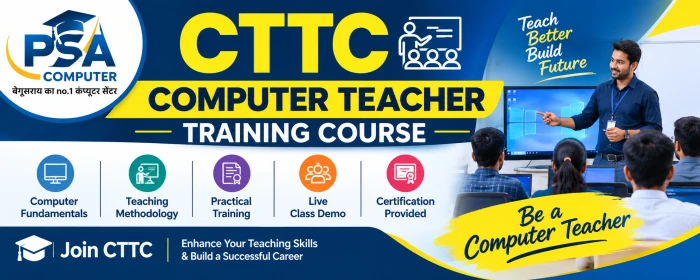
The Computer Teacher Training Course (CTTC) by PSA Computer is a comprehensive, career-oriented training program designed for students and aspiring professionals who want to develop computer skills, improve their teaching abilities, and explore opportunities in the digital and education sectors.
This 12-month program combines computer applications, practical training, digital tools, teaching methodology, communication skills, artificial intelligence tools, mobile applications, and YouTube content creation. The course focuses on building practical knowledge that learners can apply in educational institutions, offices, freelance projects, and their own skill-based businesses.
Course Name: Computer Teacher Training Course
Short Form: CTTC
Duration: 12 Months
Daily Training: Approximately 1.5 Hours
Training Mode: Classroom and Practical-Based Learning
Institution: PSA Computer
This module builds a strong foundation in computer applications and essential professional skills.
Computer Fundamentals: Introduction to computers, hardware, software, operating systems, file management, and basic troubleshooting.
MS Office: Practical training in MS Word, MS Excel, and MS PowerPoint for documentation, calculations, data management, presentations, and office work.
Multimedia and Internet: Internet usage, online research, digital resources, file handling, and multimedia fundamentals.
Graphic Designing: Introduction to graphic design, creative layouts, posters, banners, certificates, and other digital designs.
Coding: Introduction to programming concepts and basic coding skills.
Accounting and GST: Introduction to accounting software, Tally Prime, accounting entries, GST concepts, and business records.
Hindi and English Typing: Typing practice to improve speed, accuracy, and professional documentation skills.
Learn to use digital productivity and collaboration tools for teaching, office work, and everyday professional tasks.
Google Docs: Create, edit, and format professional documents.
Google Sheets: Manage data, prepare tables, use formulas, and maintain records.
Google Slides: Design presentations for teaching, seminars, and professional meetings.
OneDrive: Understand cloud storage and online file management.
Google Maps: Learn location search, navigation, and map-related features.
Gmail: Manage professional email communication and attachments.
Google Meet: Understand online meetings and virtual classes.
Google Classroom: Explore digital classroom management and online learning resources.
Google Business: Introduction to online business presence and business profile management.
Google Forms: Create online forms, quizzes, surveys, and feedback forms.
Google Keep Notes: Organize notes, reminders, and important information.
Google Calendar: Schedule classes, meetings, tasks, and activities.
Develop the interpersonal and professional skills required for teaching, employment, and entrepreneurship.
Teaching Skills: Learn the fundamentals of explaining concepts, preparing lessons, managing classes, and engaging learners.
Communication Skills: Improve professional communication, presentation, and interaction with students and colleagues.
Interview Skills: Understand interview preparation, professional introductions, and common interview practices.
Personality Development: Build confidence, professionalism, and a positive approach to learning and work.
Entrepreneurial Skills: Understand the fundamentals of planning and managing a small skill-based business or educational venture.
Get introduced to AI-powered tools that can support learning, teaching, productivity, research, and content creation.
ChatGPT: Explore AI-assisted writing, explanations, brainstorming, and educational content creation.
Khan Academy: Discover digital learning resources and educational support tools.
Notion: Organize notes, study materials, tasks, and projects.
Canva: Create presentations, posters, thumbnails, and educational graphics.
Grammarly: Explore grammar checking and writing assistance.
Other AI Tools: Introduction to additional AI tools and their practical applications in education and digital work.
Learn about useful mobile applications for educational activities and digital content creation.
PixelLab: Create text-based graphics, social media designs, and thumbnail elements.
Video Editing Apps: Explore mobile video editing, basic editing workflows, and content preparation.
Student Apps: Understand useful educational applications for learning, study management, and productivity.
Understand the fundamentals of creating and managing a YouTube channel for educational content, personal branding, and digital skill development.
YouTube Channel Creation: Learn the basic process of setting up and customizing a channel.
Finding a Niche: Identify a suitable content category and target audience.
Script Writing: Prepare structured video scripts, introductions, explanations, and calls to action.
Video Editing: Understand editing fundamentals to make videos clear, engaging, and professional.
Thumbnail Designing: Learn to create relevant, readable, and attractive video thumbnails.
YouTube SEO: Understand keyword research, titles, descriptions, metadata, and search optimization.
Channel Growth: Learn the fundamentals of content planning, audience retention, consistency, and performance analysis.
The course emphasizes the practical application of computer and digital skills. Learners can develop experience through relevant exercises, document creation, presentations, graphic design tasks, typing practice, digital tools, and content creation activities.
The objective is to help learners understand how these skills can be used in educational, office, freelance, and entrepreneurial settings.
After developing the relevant skills and experience, learners may explore opportunities such as:
Computer Teacher or Computer Trainer
Computer Institute Instructor
Office Assistant or Computer Operator
Data Entry Operator
Digital Marketing Assistant
Graphic Design and Video Editing Projects
Freelancing and Online Work
YouTube Content Creation
Cyber Cafe or Digital Service Centre
Photo Editing and Printing Services
Computer Coaching Centre or Training Institute
Employment and self-employment opportunities depend on individual skills, practical experience, eligibility requirements, and local market demand. Government jobs require the applicable recruitment qualifications and selection process.
Regular Course Fee: ₹20,000
Special Offer Fee: ₹9,999
Special Fee for PSA Students: ₹2,999
Special offer fees are subject to the applicable terms and availability.
Structured, multi-skill computer training
Practical exposure to computer applications and digital tools
Introduction to teaching methodology and communication skills
Exposure to AI tools and digital productivity applications
Basic understanding of YouTube content creation and channel growth
Career-oriented learning for students and aspiring computer trainers
Start building your computer, teaching, and digital skills with CTTC at PSA Computer. Learn practical skills, strengthen your professional confidence, and prepare to explore new career opportunities.
Complete ADCA Package
Computer Repairing
Google Apps Mastery
Mobile Apps Mastery
AI Mastery
Soft Skills
Facebook & Youtube Mastery